
Introduction
Safety is an important and growing concern to Lyft and Motivate. Critical Quality Checks are a new set of Quality metrics. There are currently two metrics that will impact on the Battery Swap departments, but more may be introduced at a later date. Failing to achieve either of these metrics will result in penalties from our Lyft partners and jeopardize Motivate’s standing as a Lyft service provider.
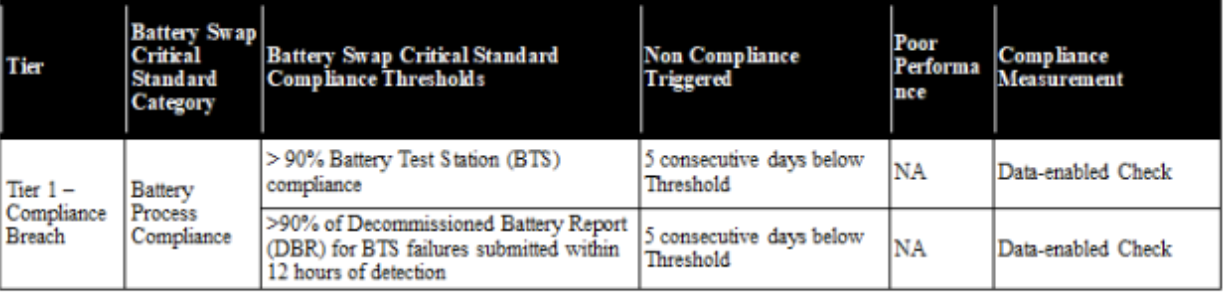
As of March ’25, Motivate Business Operations team is working to get a data feed for these metrics and visualize them in Tableau. In the interim both can be observed in Air Control. These metrics only apply to Cosmo batteries.
To view the AC dashboards, please use this link: Cosmo BTS Compliance Report
Battery Test Station Compliance
MTV must maintain greater than 90% BTS flashing compliance. If a Motivate market fails to maintain 90% flashing compliance for 5 consecutive days, it has failed the CQC.
Definition
Non-Compliance – Removed from a rideable in the field and then put on a different rideable in the field without being put on a flashing station in between.
Compliance – Removed from a rideable in the field, flashed on a Battery Test Station (BTS), and then put on a rideable in the field
AirControl Views
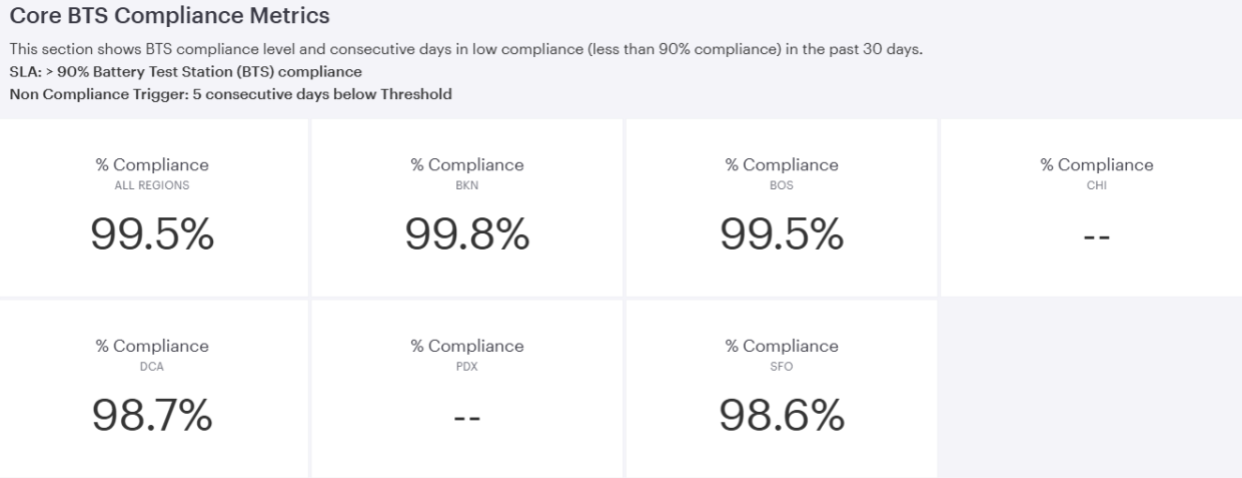
This shows the overall level of compliance for the past month. While overall compliance is not part of CQC, MTV markets should aim to maintain a > 99% compliance to ensure the safe operation of our charging environments.
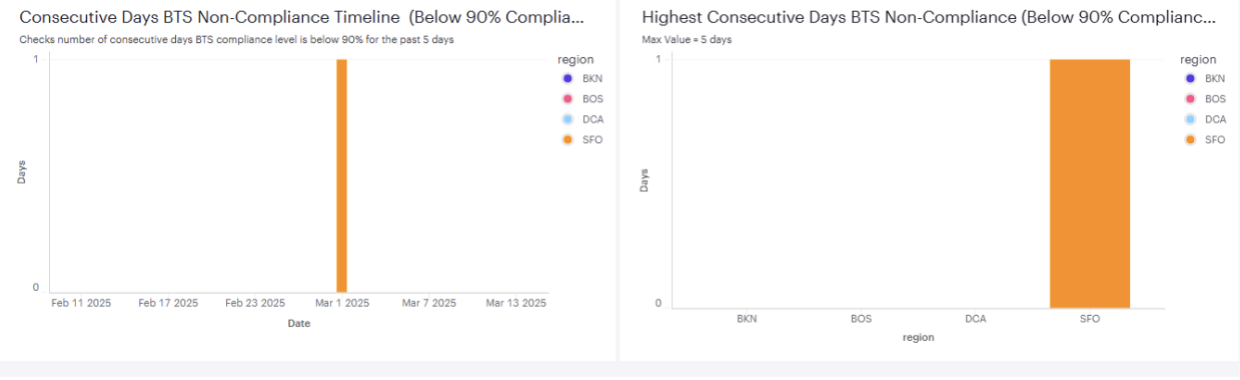
These tables show the number of days of consecutive non-compliance in the past 30 days. If a market hits 5 days of non-compliance, they will fail the metric. The graph on the left will show the timeline and the one on the right will show the highest amount of consecutive non-compliant days by market over the past 30 days.
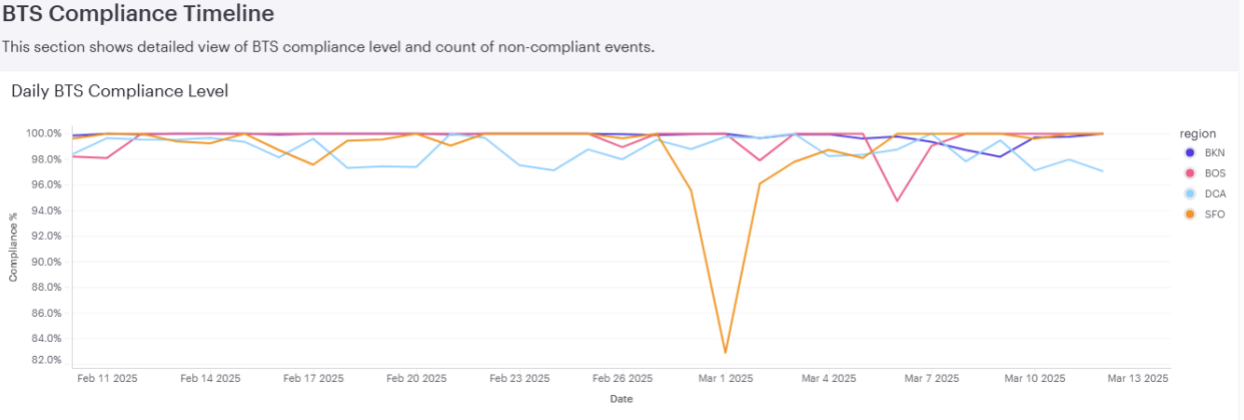
This view will allow operators to pinpoint days of non-compliance. Any dips below target should be investigated and addressed with staff.
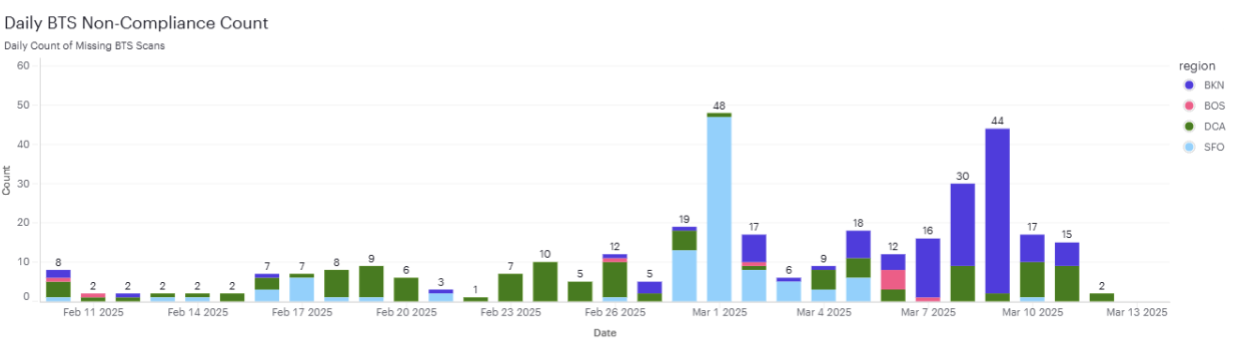
This view shows the total number of missed flashing events as defined above. Each Cosmo cart represents about 40 batteries. Non-BKN markets can fail for the day if one cart of inbound batteries missed flashing.
Core DBR Compliance Metrics
MTV must submit and confirm a DBR on any battery that fails on the testing station (purple screen) within 12 hours of discovery. Motivate must maintain 90% compliance with this metric. If MTV fails to maintain 90% compliance for 5 consecutive days, it will fail this CQC. If there are 0 BTS failures for a given day, it will count as a compliant day. This metric applies to both Purple and Red screen failures.
Definitions
Non-Compliance – Damaged Battery was not DBR’d and confirmed in AC within 12 hours
Compliance – Damaged Battery was DBR’d and confirmed in AC within 12 hours
DBR Identified – The DBR flashes Red/Purple Screen on a Flashing Station
DBR Created – The DBR is submitted in Fieldwork. This is an interim step that does not factor into compliance
DBR Confirmed – The DBR is confirmed in Air Control. This ends the timer. If under 12 hours from DBR Identified, it is compliant, if over 12 hours, it is non-compliant
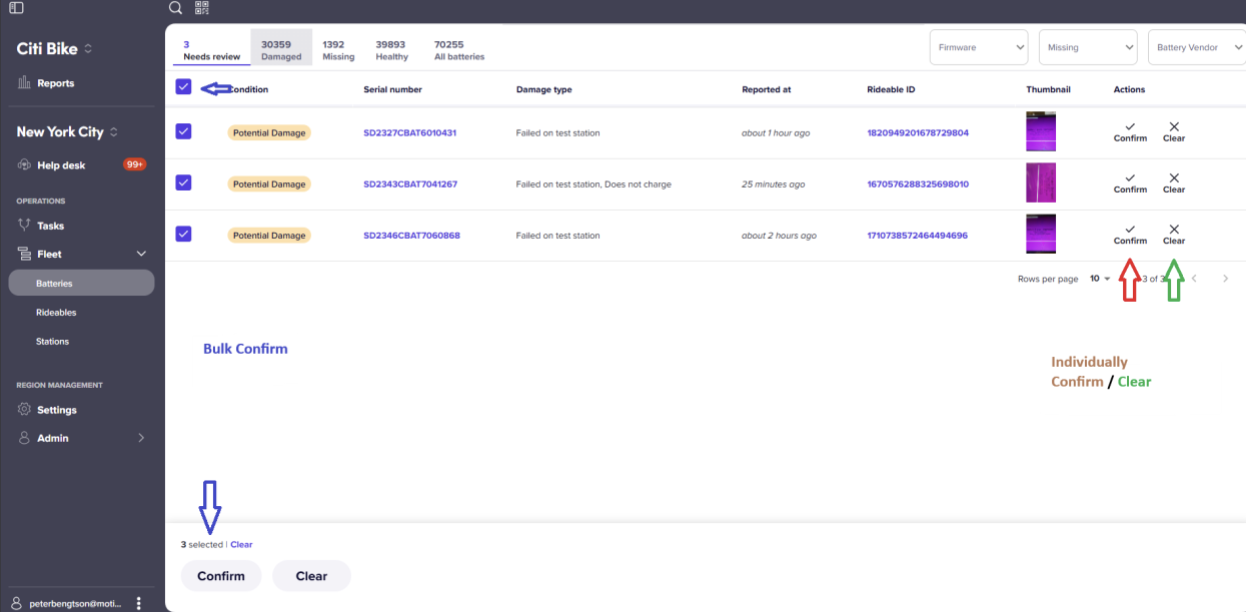
Confirming DBRs in AirControl
- Open Air Control
- Navigate to your market
- Click Fleet
- Click Batteries
- Confirm you are in the ‘Needs Review’ section
- Confirm Battery S/Ns following Market process
- Edit in Bulk or Individually
- Bulk Edit
- Click the check box in the top left corner of the page
- Click Confirm in the bottom left
- Individually Confirm
- Click Confirm on the right-hand side of the screen
- Click ‘Confirm report’ in the pop up
- Bulk Edit
8. If there is any concern to the veracity of the report, Click Clear on the right-hand side of the screen
AirControl Views
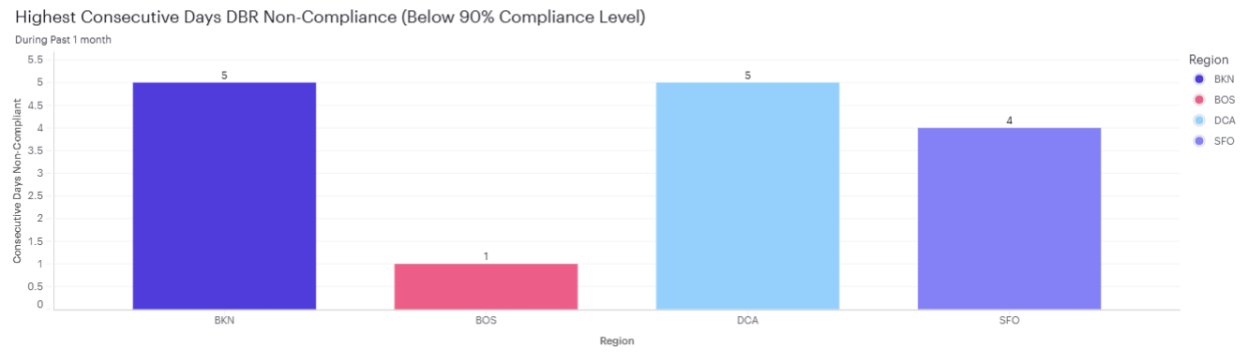
This graph shows the highest number of consecutive days that were non-compliant. If a market is non-compliant for 5 or more consecutive days, it has failed the CQC and is subject to escalating penalties.
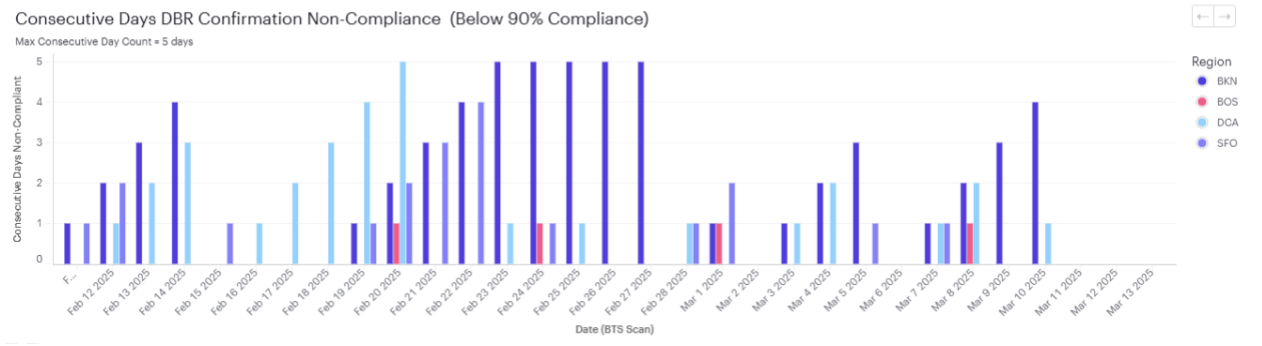
Graph showing the non-compliance on a time scale. If MTV is compliant for a day, it will reset the counter and clear the line.
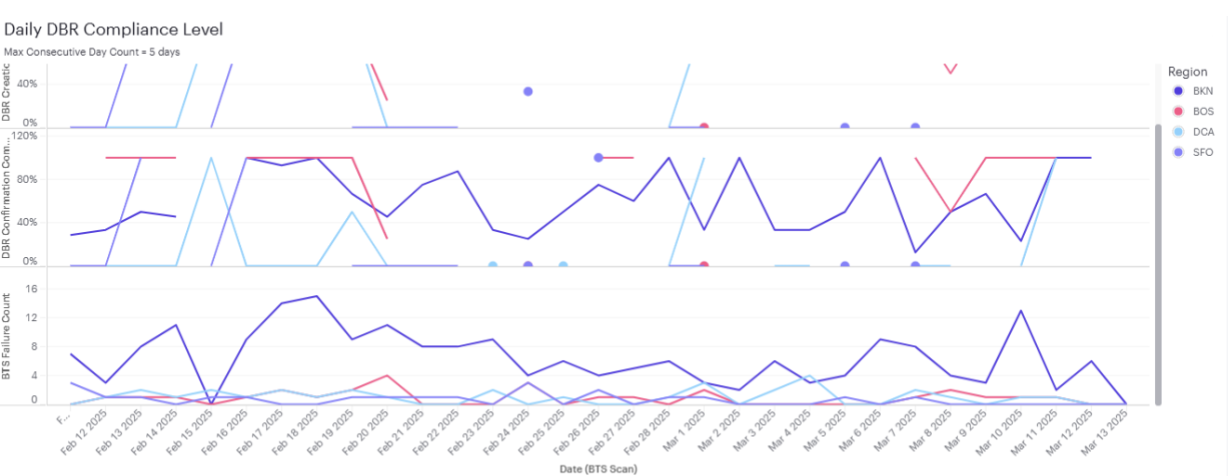
This set of three graphs shows DBR Creation compliance, DBR Confirmation Compliance,
and the total volume of Damaged Batteries. The first two graphs will help teams determine where in the process they are breaking down (submitting the DBR vs confirming the DBR).
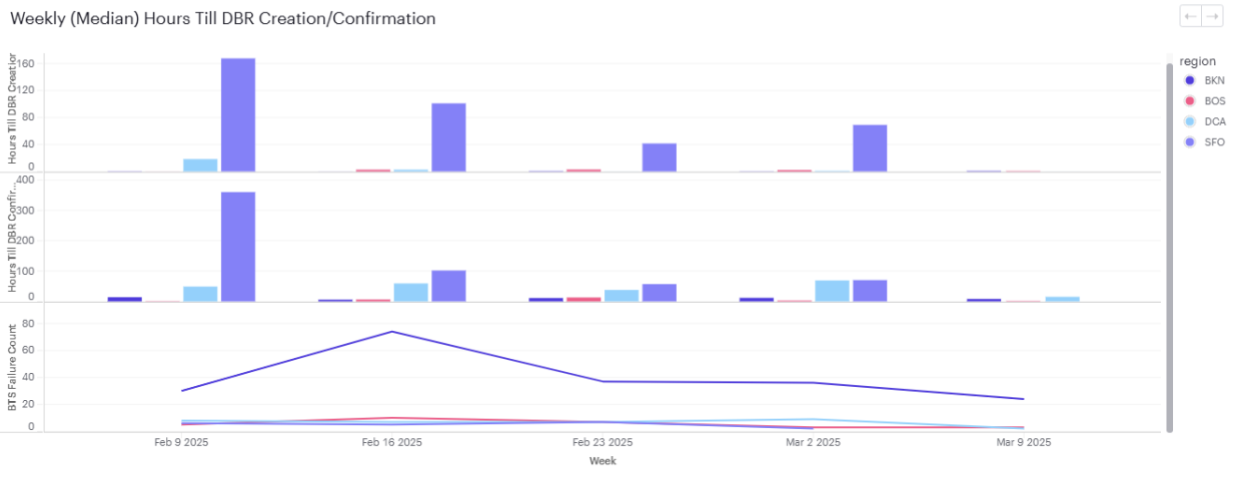
This graph shows the timeline from the DBR flashing to Creation + Confirmation. This also helps determine where in the process teams are struggling and address it with the staff responsible.